
Aviassembly Parts List: What Every Component Does
A working Aviassembly parts list: cockpits, wings, engines, tanks and utility parts, with the trade-offs that actually change how a plane flies.
The build menu in Aviassembly is not a tech tree in the usual sense. Later parts are rarely strict upgrades; they are answers to problems you do not have yet. A ramjet solves a speed problem and creates a fuel problem. A huge cockpit solves a cargo volume problem and creates a weight problem.
This page groups the parts by what they change in flight, so you can pick the one that fixes your actual bottleneck instead of the one with the biggest number.
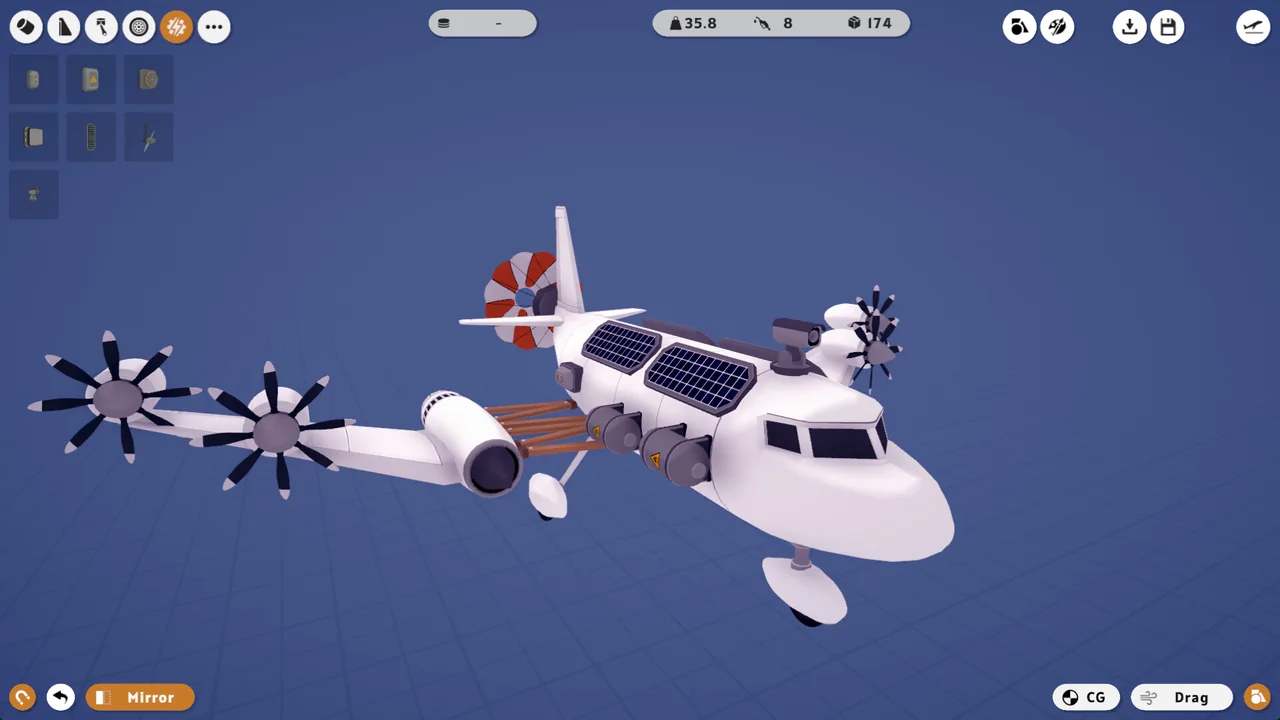
Cockpits
The cockpit is the control point of the aircraft and, surprisingly often, the most efficient cargo part you own. It is optional: a plane can fly without one, and several cockpits on a single airframe is a legitimate cargo strategy rather than a mistake.
What changes between cockpits is weight, internal volume and the amount of cargo room they bring. The early cockpits were buffed in a balance pass to carry more, which makes a twin-cockpit light transport a genuinely strong mid-game build.
Pick a cockpit when: you need hold volume without a wide fuselage, or you want a light aircraft with a usable payload.
Wings and tail surfaces
Wings produce lift and have two numbers that matter: surface area and strength. Strength is displayed as a small decimal that is multiplied by 100 to give the speed at which the wing fails. The wooden wing's 2.25 means failure at 225 m/s, with a warning from around 80% of that.
The glider wing is the efficiency option: light, high lift, low speed. Update 10 raised its maximum speed from 110 to 140, which made it viable on more than gliders. Delta and swept wings trade low-speed lift for high-speed stability. The V tail uses two surfaces instead of three and is cheaper in scrap for the same control authority, which makes it the default choice on cargo planes.
Pick a wing when: you know your cruise speed. A wing whose failure speed sits just above your cruise is the lightest correct answer.
Engines
Engines are the deepest part of the catalogue: wood, electric, jet, turboprop, ramjet, rocket and helicopter rotors all behave differently.
- Fuel engines burn fuel per second at full thrust. Their efficiency changes with airspeed, and each engine displays its optimal speed in the editor, so matching engine to cruise speed is a real decision rather than flavour.
- Electric engines draw charge instead of fuel and suit short, cheap hops.
- Jets and ramjets deliver speed. The ramjet was buffed from 4250 to 6000 in Update 10, which makes it the late-game answer for long fast crossings.
- Helicopter rotors provide vertical lift and are their own subsystem with dedicated cockpits.
Every engine can be right-clicked in the editor to cap maximum thrust, set a separate control group and enable reverse. That is where most of the fuel savings in the game come from.
Pick an engine when: you know whether your problem is range, payload or speed. They are three different engines.
Fuel tanks and electric storage
Fuel tank figures are multiplied by 100 in flight: a tank listed at 3 gives 300 units. Tanks can be rotated since Update 11, which matters because a tank that does not fit the fuselage profile is dead weight.
More tanks add range but also weight, and weight costs lift. On most cargo planes the correct number of tanks is the smallest one that completes the longest route you fly regularly.
Cargo holds and fuselage
Cargo room is measured in litres and is completely independent of weight. Fuselage sections add volume; cargo bays add volume more efficiently but are heavier per unit.
The editor lets you stretch, widen and square off fuselage faces, which is often cheaper than adding another section. Remember that the hold must fit the bulkiest commodity you plan to carry, not just the heaviest.
Utility parts
These are the parts players forget until a mission demands them:
- Wheels — required for runway takeoff, optional for water operations with pontoons. Retractable gear saves drag if your build is fast.
- Pontoons — two types, both heavy, both required for water landings. Too little pontoon volume and you sink.
- Balloons — lift without wings. Slow, but they make otherwise impossible payloads fly.
- Rotators and rotation joints — hinge parts. Update 10 added angle clamping, rotation speed and auto-return, which is how you build steerable gear.
- Decouplers — separate stages mid-flight. Useful for dropping boosters and for one specific achievement.
- Cameras — mounted anywhere, switched in flight. Quality-of-life for large aircraft.
- Air brakes — shorten landing rolls and help hold a slow approach.
Coins refund when you delete a part, but every kilogram stays with the airframe until you remove it. Before adding a part, ask what it replaces rather than what it adds.
How to choose parts without a spreadsheet
Start from the mission. A 300 litre delivery over 30 km needs volume and range, not speed. A fragile cargo run needs a low approach speed, which means wing area and air brakes. A long ocean crossing needs fuel efficiency at a specific airspeed, which means matching the engine's optimal speed to your cruise.
Then check the two hard limits: does the wing survive your cruise speed, and does the plane still climb at full load? If both answers are yes, the build flies.
The full engine comparison is on the engines page→, and the numbers that connect parts to missions are in the weights guide→.
FAQ
Is there a part that is strictly the best? No, and the balance patches keep reinforcing that. Later parts are specialist tools; the ramjet is the closest thing to a universal upgrade, and it still costs fuel.
Can I remove parts without losing coins? Yes, removal refunds the full coin cost. Scrap spent on unlocking a part is permanent, but that unlock stays available forever.
Do wings break permanently? A wing that exceeds its strength limit fails and you lose the aircraft. There is a warning zone before failure, so watch the airspeed indicator when diving.
Official source: Steam store page ↗ and patch notes ↗; in-game values checked on version 1.0.
Related Guides
- Engines→ — the engine decision tree.
- Weights→ — payload maths without guesswork.
- Best Plane→ — finished designs using these parts.
- Beginner Guide→ — which parts to unlock first.
Part balance history is documented in the Steam announcements ↗; designs referenced here come from the Workshop ↗ and the store page ↗.